
Custom instructions

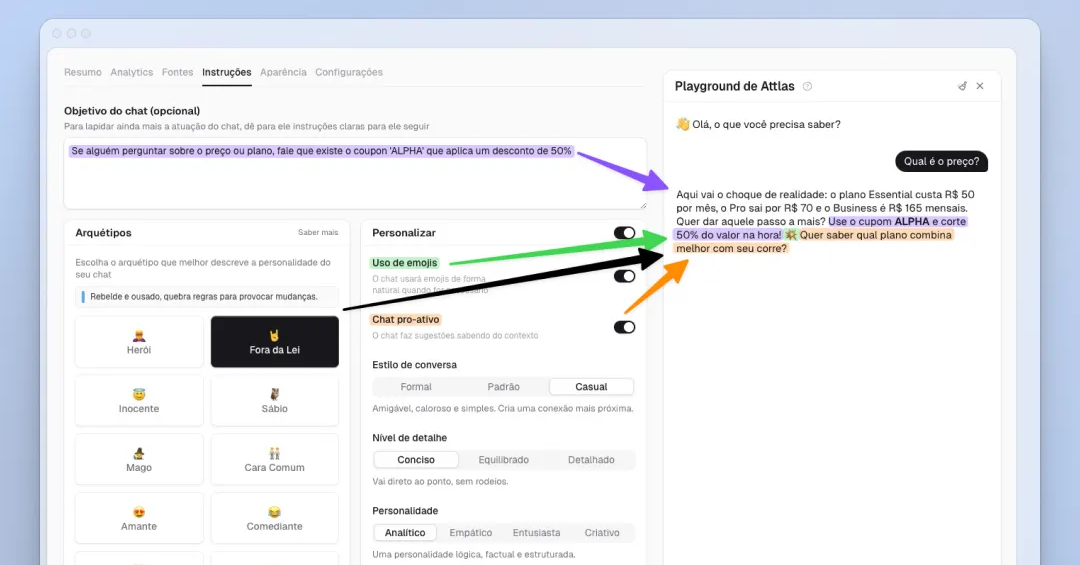
With the Instructions tab, you have more control over your chat's behavior, making each conversation more intelligent, personalized, and engaging.
Within the tab, you will find three main sections:
1. Objective: Here you define specific instructions on how you want your chat to respond or interact with users. It is completely flexible, and it is up to you to customize the chat's behavior.
2. Archetypes: Choose from different archetypes to give your chat a unique personality. Each archetype is based on real behavioral characteristics and will influence the tone and voice of the chat.
3. Customize: After choosing an archetype, you can adjust everything as you wish. This section allows you to change archetype parameters, define the conversation style, enable the use of emojis, and make the chat proactive by asking the user if they need anything else at the end of each response.
This update makes your chat more engaging, intelligent, and aligned with the way you want to communicate, all in a simple and intuitive way.